


Aetna Better Health - Medicaid
3.2356.00 Reviews
App Specs
- Version
- 8.8
- Updated On
- License
- Free
- Downloads
- 100,000+
- Developer
- Aetna Inc
- Categories
- Medical
- Platform
- Android, iOS
Screenshots
 Analysis by AppCompare
I treat a health plan app as a practical tool, not a replacement for a clinic, a phone call, or a paper record. That distinction matters with Aetna Better Health - Medicaid: its value is in helping members handle routine plan-related tasks from a phone, especially when they need to check something while away from home. I’d think of it as a convenient front door to health care tools, rather than a place to solve every care or coverage question.
That convenience depends on the moment. A provider search or a claim check is most useful when the app can connect and load current account information, so I would not make it the only way I keep details needed for an appointment. Before heading out, I’d confirm important information while I have a reliable connection and keep the clinic’s contact details somewhere accessible. That small habit makes a phone-based workflow less stressful if reception is poor at the office or on the way there.
When a connection is part of the experience
Network access is especially relevant for tasks that depend on current plan information. If I’m checking a claim, looking for an in-network provider, or opening account-specific material, I’d expect the app to need a working connection to retrieve what I need. A slow or interrupted connection can turn a quick check into a wait, so I’d avoid leaving a provider search until the moment I’m already standing at a reception desk.
There is a useful distinction between preparing and confirming. I can use a connected moment at home to identify a provider or review a claim, then note the practical details I’ll need later, such as the name and location. I would still confirm the details before relying on them for a visit, because networks and individual circumstances can make health-plan decisions more specific than a search result alone suggests.
Useful in everyday mobile situations
The app makes most sense for a member who already uses a smartphone to handle small administrative jobs. For example, if I have a few minutes between errands, I can check a claim rather than waiting until I’m at a computer. If a family member asks whether I have found a doctor, the provider search can help me start narrowing down options while we talk. These are modest tasks, but moving them onto a phone can make them easier to fit into a busy day.
It can also help when a health routine involves more than one moving part. A medication reminder, a claim status check, and a provider search serve different needs, so I’d use each for a particular task instead of treating the app as a single all-purpose health record. The reminder may help me remember a dose, for instance, while medication questions that affect treatment still belong with a pharmacist or clinician.
What to do when something does not load
When a screen stalls, I would first check whether the phone has a working connection and try again somewhere with steadier reception. If I’m still unable to get the information, I would avoid repeatedly submitting a request or assuming that a blank or delayed screen means a claim has changed. For a time-sensitive coverage question, contacting the plan through an appropriate support channel is more sensible than guessing from an incomplete view.
Worth Reading Before You Choose

EA SPORTS FC Mobile 26 Is a Bigger Football Game, but It Takes Time

Flipboard Shows What News Apps Must Do Beyond the Feed

Switching to Android Auto Means Rethinking Your Driving Routine

Google Calendar Makes a Crowded Week Easier to Manage

Ludo King Makes the Most of the Minutes Between Plans

Baby Panda World Brings Quick Play to Modern Phones, but Its Game Library Feels Busy
It is also worth separating an app problem from an account or plan question. A login issue may need support, while an unclear claim or provider result may need a direct explanation from the plan or provider. Keeping those questions distinct can save time: describe what you were trying to do, what screen you reached, and whether the problem repeats after reconnecting. That gives a support conversation a useful starting point without relying on memory alone.
Keeping mobile use deliberate
Health apps handle information I consider personal, so I would use this one thoughtfully on shared or public devices and keep my phone’s own access protections in place. A biometric sign-in can be convenient if the app offers it on your device, but it does not remove the need to protect the phone itself. I’d also avoid discussing account details where other people can easily see the screen.
For someone watching mobile data use, I’d reserve the app for targeted checks rather than leaving it open while browsing without a purpose. A quick claim review or provider lookup is a clearer use than repeatedly refreshing a page that has not changed. If data access is limited, doing plan research over a dependable connection before leaving home is a practical way to reduce avoidable frustration.
Your Health, Simplified
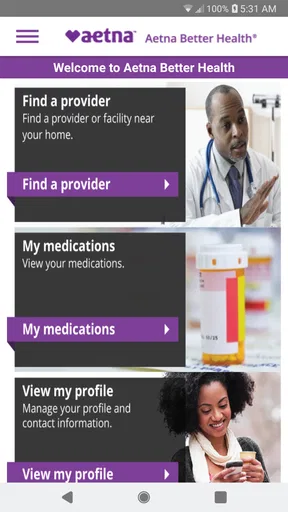
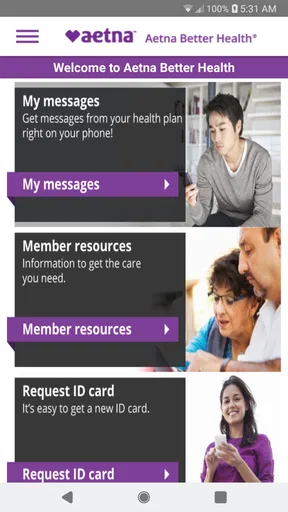
First things first, let’s talk about the user-friendly interface. The moment you open the app, you’re greeted with a clean and straightforward design. Navigation is a breeze, even if you’re not the most tech-savvy person. You can easily access all the essential features right from the home screen, which makes checking your benefits, finding providers, and managing your health plan as simple as pie.
Features That Stand Out
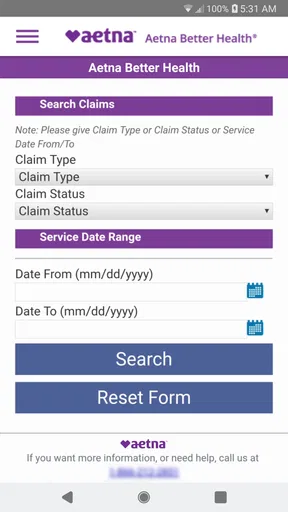
One of the standout features of the Aetna Better Health - Medicaid app is the ability to view and manage your claims. You can track the status of your claims in real-time, which means no more guessing games about where your claim stands. Plus, the app provides detailed information about each claim, so you’re always in the loop.
The app also offers a handy medication tracker. You can set up reminders for your medication, ensuring you never miss a dose. It’s like having a personal assistant keeping tabs on your health routine. And if you’re ever unsure about your medication, there’s a feature to look up drug information, which is super helpful.
Connecting with Care
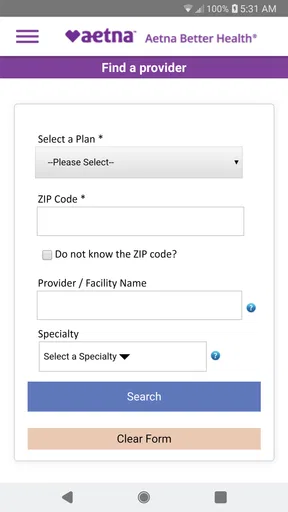
Finding the right healthcare provider is crucial, and this app makes it easier than ever. With a built-in provider search feature, you can quickly locate doctors, specialists, and facilities within your network. The search filters make it simple to find exactly what you need, from specific specialties to locations near you.
Another cool feature is the telehealth option. In today’s world, virtual consultations are becoming the norm, and this app has a seamless way to connect you with healthcare professionals from the comfort of your home. It’s convenient, especially if you’re not feeling up to an in-person visit.
Security and Accessibility
Your health information is sensitive, and Aetna Better Health - Medicaid takes security seriously. The app uses advanced encryption to ensure your data is safe and secure. Plus, with biometric login options like fingerprint or facial recognition, access is not only secure but also quick and easy.
Accessibility is another strong point. The app supports multiple languages, making it accessible to a broader audience. Whether you’re fluent in English or prefer another language, you can navigate the app with ease.
Getting Started
Setting up the app is straightforward. Once you download it from the App Store or Google Play, you’re just a few steps away from accessing all its features. You’ll need to create an account or log in with your existing Aetna member credentials, and then you’re good to go.
If you ever run into issues or have questions, the app offers robust support options. There’s a help center packed with useful information, and if you need more personalized assistance, customer support is just a tap away.
Who will get the most from it?
I’d recommend it most to people enrolled in Aetna Better Health who want a phone-based way to handle common plan tasks. The app is free, developed by Aetna Inc, and is intended for a general audience. It has an average rating of 3.3 from around 670 ratings, with more than 100,000 installs. Those figures suggest it has reached a meaningful number of members, though the rating also makes me cautious about calling the experience flawless.
It is a better fit for someone comfortable signing in and checking details on a mobile screen than for someone who prefers every insurance matter handled by a person. If you are helping a relative, the app may be useful when that member’s account access is available, but I would not assume it replaces permission or other steps required to discuss another person’s health plan. For urgent medical needs, use the appropriate care service rather than relying on an app search or message.
A realistic day with the app
Imagine I have a routine appointment coming up and want to check whether a nearby clinician is in my network. I would search before leaving, review the result, and contact the office to confirm it accepts my plan and is taking appointments. If I have also submitted a claim, I can check its status later when I have a stable connection, rather than trying to make sense of it while rushing between errands. That sequence uses the app as a starting point while leaving final confirmation with the people who can answer for the specific visit.
For medication reminders, I would set them around a routine I can actually follow, not simply turn on alerts and assume the problem is solved. A reminder is helpful when a day gets busy, but it cannot decide whether a dose should be changed or answer a question about side effects. Keeping that boundary clear is one of the most useful ways to benefit from the feature without treating it as medical advice.
How it compares with other ways to manage care
Compared with calling the plan for every basic lookup, a member app can be quicker for checking a claim or beginning a provider search. Compared with a general health tracker, its focus is more directly tied to plan administration and care access. That focus is useful if you are an Aetna Better Health member, but it also limits its appeal: someone seeking a comprehensive personal health record, broad appointment management across unrelated providers, or clinical guidance should look to the relevant provider tools and professional care instead.
I would also keep the insurer’s app alongside, not in place of, a provider’s own portal when the goal is to manage appointments or communicate about treatment. The plan app can help with the insurance side of a decision; the clinic is usually the better source for details about its schedule and your care. Using the right channel for each question avoids expecting one app to cover responsibilities that belong elsewhere.
Version, setup, and practical trade-offs
The current version is 8.6, and the app’s release date was February 11, 2015. It requires iOS 8.1 or later, so anyone using an older Apple device should check compatibility before planning around it. As with any member app, having the app installed is only part of setup: you still need the account credentials and a connection when accessing information that depends on your plan account.
One trade-off is that a phone makes quick checks convenient but can make detailed claim information harder to read than it would be on a larger screen. If a claim explanation is confusing, I would use the app to locate the item, then take time to review it carefully or ask the plan for help. I would not treat a brief status label as a complete explanation of what I may owe or what action is needed.
Final Thoughts
Overall, the Aetna Better Health - Medicaid app is a fantastic tool for anyone looking to keep their healthcare organized and accessible. It’s packed with features that cater to your needs, from managing claims to finding providers and scheduling virtual visits. Plus, the emphasis on security and accessibility ensures everyone can use it confidently.
If you’re a Medicaid member with Aetna, this app is definitely worth downloading. It’s designed to make your life easier, and let’s be honest, who doesn’t want a little extra convenience when it comes to managing their health?
So, what are you waiting for? Give it a try and see how it can streamline your healthcare experience. Trust me, once you get the hang of it, you’ll wonder how you ever managed without it!
My connectivity verdict
For me, the strongest case for using this app is having a convenient way to reach plan tools when I have a connection and a specific task in mind. I would keep it for claim checks, provider research, and routine reminders, while saving important contact details and confirming care arrangements directly. That balance makes the phone useful without making it the only route to information.
I would skip it if I were not an Aetna Better Health member, needed a dependable substitute for a conversation about a complicated coverage decision, or wanted one app to manage every aspect of treatment. For eligible members who are comfortable with mobile account access, though, it can be a sensible companion. Its best role is a practical bridge between everyday questions and the people or services that can resolve them, not a guarantee that every task will work regardless of connectivity.
Pros
- Easy to navigate interface.
- Provides real-time health updates.
- Access to 24/7 nurse hotline.
- Secure and private data handling.
- Detailed health plan information.
Cons
- Limited offline functionality.
- Occasional login issues.
- No direct doctor appointment booking.
- App performance can be sluggish.
- Notifications can be overwhelming.
FAQs for Aetna Better Health - Medicaid
What is Aetna Better Health - Medicaid, and who can use it?
Aetna Better Health - Medicaid is a mobile app designed to help people manage their Medicaid health benefits. It provides easy access to plan information, claims, and health resources. The app is intended for Medicaid members enrolled with Aetna Better Health, making it easier for them to track their benefits and manage their healthcare needs efficiently.
How can I access my healthcare details using the app?
The app provides a user-friendly interface where you can view your healthcare details such as insurance plan information, coverage, and claims. After downloading the app, you need to log in with your member ID and password. Once logged in, you can navigate through various sections to access your health records, find providers, and view prescription information.
Can I manage my appointments through the Aetna Better Health app?
Yes, the Aetna Better Health app offers features that allow you to manage your healthcare appointments. You can schedule, view, and set reminders for upcoming appointments directly within the app. This feature helps ensure you stay on top of your healthcare needs without missing any important medical appointments.
Is my personal information secure in the Aetna Better Health app?
Aetna Better Health prioritizes the security of your personal information. The app uses advanced encryption methods and secure login protocols to protect your data. Additionally, users are encouraged to use strong passwords and enable any available security features, such as biometric authentication, to further safeguard their information.
Does Aetna Better Health app offer customer support if I encounter issues?
Yes, the app provides customer support to assist users with any issues they may encounter. There is a dedicated support section within the app where you can find contact details. You can reach out via phone or email for assistance, ensuring you receive the help you need with using the app or understanding your health benefits.


